
KNOWHUBS / REPORTING EXAMPLE
Make your weekly
order export useful.
See how one export can become an editable Excel report, with a guide to updating it from the next export.
See what was dispatched, what is overdue and which records need checking.
Future project guide price £195 · Questions welcome by email. Paid bookings are not open.
FREE WORKED EXAMPLE / FICTIONAL DATA
Which orders need
attention this week?
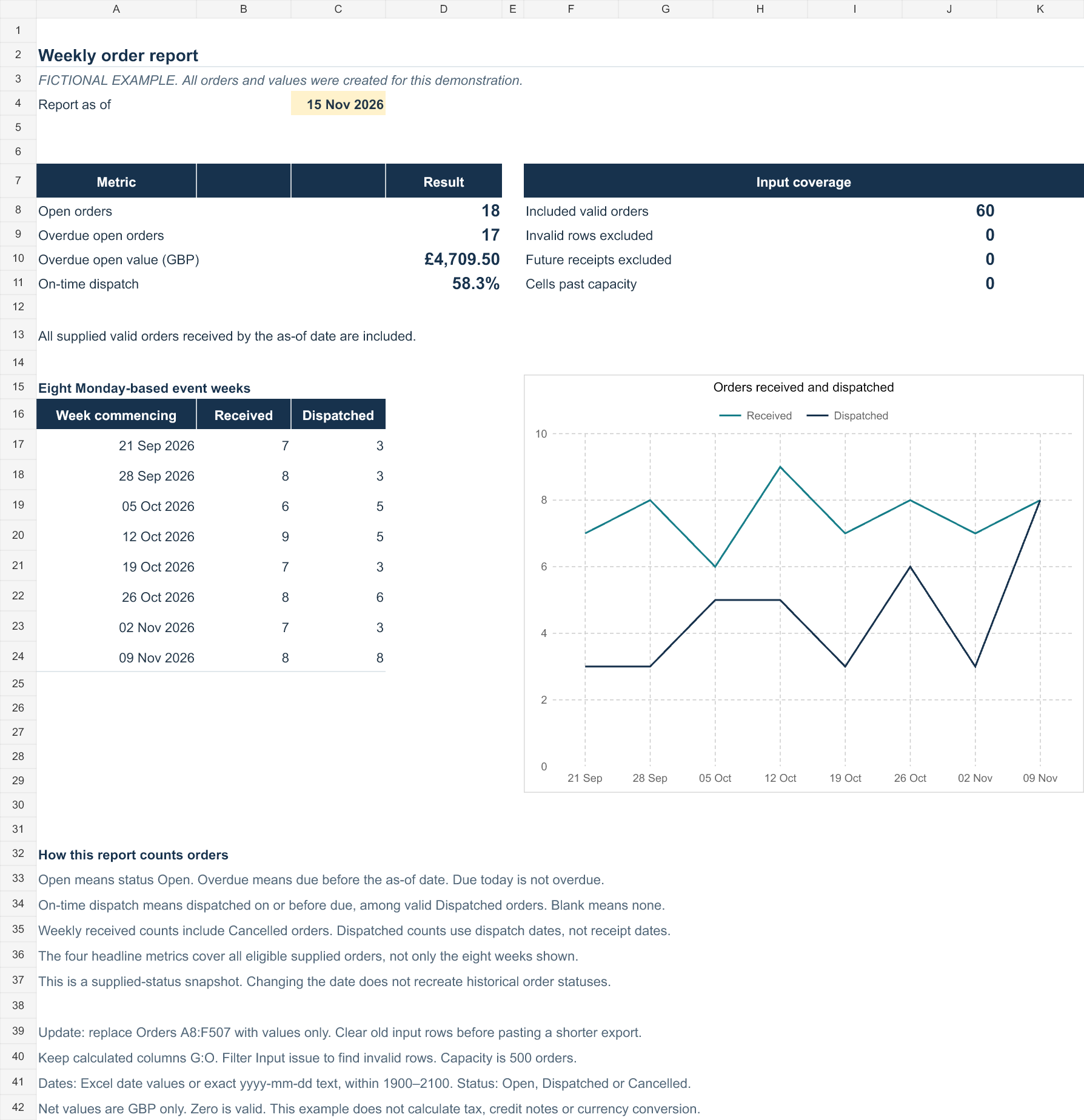
Open the workbook to inspect the source, calculations and results. The example uses 60 made-up orders and a reporting date of 15 November 2026. It shows open orders, overdue open orders and value, on-time dispatch, weekly activity and records that need checking.
This is a demonstration, not a customer result. Open means the supplied status is Open; dispatch does not prove delivery. The workbook accepts up to 500 input rows. Read the guide before replacing the sample data.
Files download directly. No account or contact details required. The example contains no VBA or live data connection.
Reporting date→Measures→Data checks
Workflow illustration · final layout agreed for your report
THE OUTPUT
A report you can
inspect and learn from.
The source, rules and results belong together. The example shows a route from fictional source records to calculations, review lists and a summary.
- 01
Keep the source visible
One agreed column layout, with instructions for replacing it with your next export.
- 02
Make the exceptions clear
Agreed measures and review lists, with date rules and data checks explained.
- 03
Know how to update it
A short guide covers the update steps, known limits and what to check before using the results.
POSSIBLE PROJECT SCOPE
One export.
One agreed report.
For a future project, the source fields, row limit, measures, reporting date, outputs, fixed price and delivery date would be agreed before work starts.
A guide for the proposed scope below, not a fixed quote or an offer to book. You can ask a general question by email. Paid bookings and payments are not open.
Proposed bounded scope
- One CSV or XLSX export with one agreed column layout and up to 500 current rows.
- A reusable, editable Excel workbook with the agreed measures, summary and exception lists.
- A documented process for updating from later exports in the same layout.
- A short guide covering update steps, date rules, data checks and known limits.
- One consolidated revision round within the agreed scope and review period.
Agree the fit first
More than 500 rows, a new source layout, an extra report or additional measures would need review and a separate quote before work starts. This proposed scope does not include VBA, live integrations, account access, bookkeeping or accounting advice.
The report is intended for Excel desktop. The target version would be agreed before work, with delivery notes stating what was tested and any limits. Compatibility with other spreadsheet apps is not included.
LOCAL BRIEF BUILDER
Prepare the brief.
Keep it on your device.
Write down what you export and what you need to decide. Copy or download a plain-text brief to your device. Nothing is sent to Knowhubs.
Questions welcome by email. Paid bookings are not open. This preparation tool has no contact-detail fields or submission endpoint. Email is a separate, optional step.
Add 20–2,000 characters to enable copying and downloading.
Describe columns and decisions, not individual records. Leave out names, addresses, payment details, passwords and confidential data. This builder uses page memory only. It has no uploads, accounts or saved brief library. Leaving or reloading clears your entries.
General questions can be emailed separately. Paid bookings are not open. Preparing a brief does not send it to Knowhubs, place an order or book work. You decide where to keep or share your downloaded file.
QUESTIONS / KNOWHUBS
Ask about the
worked example.
Tell us what you are trying to understand, or which columns and decisions a future report would need to cover.
Paid bookings and payments are not open. Sending a question does not reserve work or create an order.
Email Knowhubs
Use a short description or made-up examples. Do not attach customer records, employee information, payment details, passwords or confidential files.
This opens your email app. Nothing is sent until you choose to send the message there. Read how email enquiries are handled. This page does not connect to or read your inbox.